No business is immune to disruption. Whether it's a cyberattack that locks down critical systems, a natural disaster that shuts down a facility, a key supplier going under, or a pandemic that forces an entire workforce to operate remotely overnight, the question isn't whether disruption will happen — it's whether the organization is ready when it does. Business continuity planning is the discipline of preparing for that moment: identifying what could go wrong, deciding in advance how the organization will respond, and building the systems and habits that let operations keep running, or resume quickly, when something breaks.
This article walks through the core strategies that make up an effective business continuity program, from foundational risk assessment through recovery execution, along with practical guidance for building a plan that actually works when it's needed.
What Business Continuity Planning Actually Means
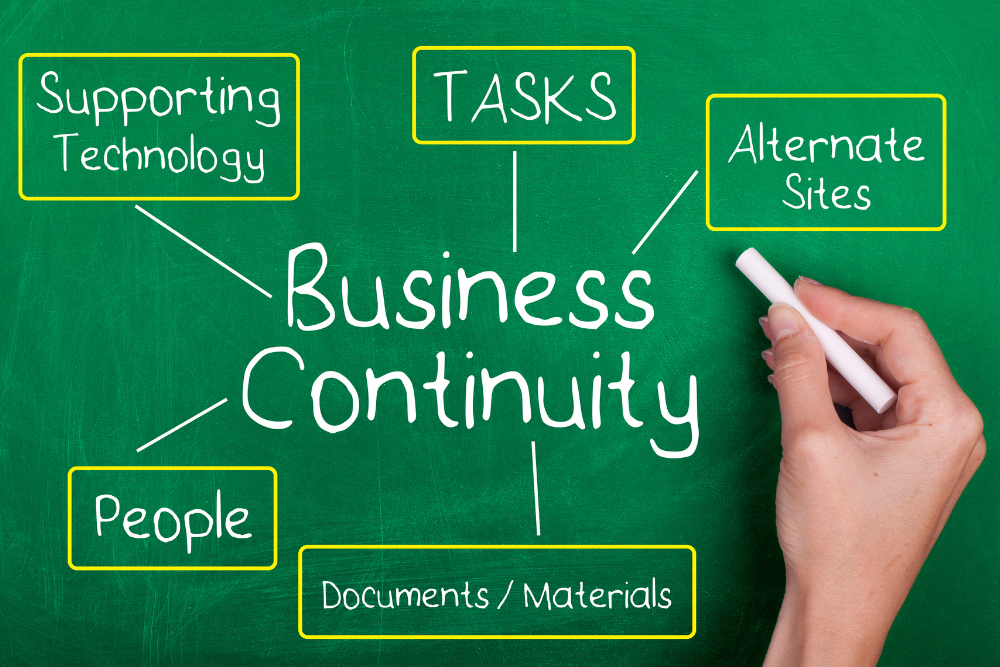
Business continuity planning (BCP) is the process of creating systems and procedures that allow an organization to continue operating — or recover quickly — during and after a disruptive event. It's often confused with disaster recovery, but the two are related rather than identical. Disaster recovery typically focuses narrowly on restoring IT systems and data after an incident, while business continuity takes a broader view, covering people, processes, facilities, suppliers, communications, and technology all at once.
A mature business continuity program doesn't just address catastrophic, headline-making events. It also covers smaller, more common disruptions: a burst pipe that floods a server room, a regional internet outage, the sudden departure of a key employee, or a single supplier missing a shipment. The goal is the same regardless of scale — minimize downtime, protect revenue and reputation, and get back to normal operations as quickly as possible.
Why It Matters More Than Ever
Organizations today are more interconnected and more digitally dependent than they were even a decade ago, which means the range of things that can disrupt operations has expanded considerably. A single cloud provider outage can now ripple across thousands of businesses simultaneously. Supply chains that once had built-in redundancy have, in many industries, become leaner and more concentrated, which increases the impact when one link fails. At the same time, customers and regulators increasingly expect organizations to demonstrate resilience — some industries, particularly finance and healthcare, face regulatory requirements around continuity planning specifically because the cost of downtime extends beyond the business itself.
Conducting a Business Impact Analysis
Before an organization can build a continuity strategy, it needs a clear picture of what's actually at stake. That's the purpose of a business impact analysis (BIA): a structured assessment of how disruptions to specific functions, systems, or processes would affect the business over time.
Identifying Critical Functions
The first step in a BIA is mapping out which business functions are truly critical — the ones that, if interrupted, would cause immediate and significant harm to revenue, customer relationships, legal standing, or safety. Not every function carries equal weight. A manufacturing company's production line and order fulfillment process are likely far more time-sensitive than, say, its internal training program. Organizations typically rank functions by how quickly the impact of an outage would become severe, which helps prioritize where continuity resources should be focused first.
Setting Recovery Objectives
Once critical functions are identified, the BIA process typically defines two key metrics for each one:
- Recovery Time Objective (RTO) — the maximum acceptable length of time a function can be down before the consequences become unacceptable
- Recovery Point Objective (RPO) — the maximum acceptable amount of data loss, measured in time, that the organization can tolerate (for example, how far back the last usable backup needs to be)
These objectives aren't arbitrary. They should be grounded in real conversations with business leaders about what a given outage would actually cost — in lost sales, contractual penalties, regulatory exposure, or customer trust — for each hour or day it continues. Functions with tight RTOs and RPOs will require more investment in redundancy and faster recovery mechanisms than functions that can tolerate a longer outage.
Building Redundancy Into Operations
Once an organization understands what needs to be protected and how quickly it needs to recover, the next strategic layer is redundancy — building backup capacity into the systems, people, and processes the business depends on, so that a single point of failure doesn't become a full stoppage.
Technology and Data Redundancy
For most organizations, IT systems sit at the center of continuity planning, simply because so much of modern business runs through them. Key strategies here include:
- Maintaining regular, tested backups of critical data, stored in a location physically separate from the primary systems
- Using cloud infrastructure or secondary data centers to provide failover capacity if a primary system goes down
- Implementing redundant network connections so a single internet or telecom outage doesn't isolate the business
- Documenting system dependencies clearly, so IT teams know exactly what needs to be restored, and in what order, during a recovery
Backups in particular are only as good as their last successful test. A business continuity plan that assumes backups will work, without ever actually restoring from them in a drill, is taking on far more risk than it realizes.
Workforce and Facility Redundancy
Technology isn't the only thing that needs a backup plan. People and physical locations matter just as much. Organizations should consider:
- Cross-training employees so that critical knowledge isn't concentrated in a single person
- Identifying alternate work locations or enabling remote work capability in case a primary facility becomes unusable
- Maintaining relationships with multiple suppliers for critical materials or services, rather than relying on a single vendor
- Documenting institutional knowledge — processes, vendor contacts, system logins — so operations don't grind to a halt if a key employee is suddenly unavailable
This kind of redundancy tends to be undervalued because its payoff is invisible until the day it's needed. An organization that has cross-trained its team or diversified its supplier base rarely notices the benefit — until a key person leaves abruptly or a supplier collapses, and operations continue anyway.
Developing a Formal Continuity Plan
Risk assessment and redundancy provide the foundation, but they need to be translated into an actual, written plan that people can follow under pressure. A continuity plan that exists only informally, in the heads of a few senior leaders, tends to fall apart exactly when it's needed most, because those people may not be available, or the situation may be too chaotic for improvisation.
Core Components of a Continuity Plan
A well-structured plan generally includes:
- A clear statement of scope — which functions, locations, and scenarios the plan covers
- Defined roles and responsibilities, including who has authority to declare an emergency and activate the plan
- Step-by-step response procedures for the most likely and most severe disruption scenarios
- Contact information for employees, vendors, emergency services, and other key stakeholders
- Communication protocols for keeping employees, customers, and other stakeholders informed during an incident
- Recovery procedures detailing how systems, facilities, and operations will be restored to normal
Keeping the Plan Usable Under Pressure
A continuity plan is only useful if people can find it and follow it during an actual crisis, which is often the moment when normal systems — including, sometimes, the primary place the plan itself is stored — are unavailable. For that reason, plans should be stored in multiple accessible formats, including at least one that doesn't depend on the very systems that might be down (a printed copy or an offline file, for example). Plans should also be written in plain, direct language rather than dense corporate prose, since the people executing it during a crisis may be stressed, distracted, or unfamiliar with parts of the plan they don't use regularly.
Establishing Crisis Communication Protocols
How an organization communicates during a disruption often determines how much damage that disruption ultimately causes — sometimes more than the technical response itself. A well-run recovery paired with poor communication can still damage customer trust and employee morale; a rocky recovery paired with clear, honest communication often preserves both.
Internal Communication
Employees need to know quickly what's happening, what's expected of them, and where to get updates. Effective internal communication strategies include designating a single, authoritative channel for updates (rather than letting information spread informally and inconsistently), identifying backup communication methods in case primary channels — email, for instance — are part of the outage, and giving managers clear guidance on what they can and can't share with their teams.
External Communication
Customers, partners, and, in some cases, regulators or the media also need timely and accurate information. Organizations that handle this well tend to communicate early, even before all the facts are known, rather than waiting for a complete picture; they're transparent about what is and isn't currently working; and they provide realistic timelines rather than overly optimistic ones that will need to be walked back later. Designating a single spokesperson or communications lead for the duration of an incident helps keep messaging consistent and prevents conflicting information from reaching the public.
Testing and Updating the Plan Regularly
A business continuity plan that's written once and never revisited is, in practice, a false sense of security. Businesses change — new systems get adopted, key personnel turn over, offices relocate, suppliers change — and a plan that doesn't keep pace with those changes can be dangerously out of date exactly when it's needed.
Running Tabletop Exercises and Drills
Regular testing is what separates a plan that works on paper from one that works in practice. Common testing approaches include:
- Tabletop exercises, where key stakeholders walk through a hypothetical scenario together and talk through their response, step by step, without actually executing it
- Simulation drills, which go further by actually activating parts of the plan — failing over to a backup system, for instance, or relocating a team to an alternate site — to confirm it works as intended
- Full-scale exercises, which test the entire plan end to end and are typically reserved for organizations with the highest continuity requirements, given the resources involved
Each of these exercises tends to surface gaps that weren't obvious on paper: a contact list that's out of date, a backup system that hasn't actually been tested in months, or a step in the plan that assumes access to a system that would itself be unavailable during the very scenario being tested.
Building a Culture of Continuous Improvement
After any test — or any real incident — the most valuable step is a structured after-action review: what worked, what didn't, and what needs to change. Plans should be formally revisited at least annually, and updated any time there's a significant change to the business, such as a new critical system, a change in leadership, or a shift in where the organization operates. Organizations that treat business continuity as a living program, rather than a document that gets filed away after it's written, are consistently the ones that recover fastest when a real disruption occurs.
Frequently Asked Questions
What's the difference between business continuity planning and disaster recovery?
Business continuity planning and disaster recovery are closely related but not the same thing, and the distinction matters when organizations are deciding where to focus their planning efforts. Disaster recovery is generally the narrower of the two, focusing specifically on restoring IT infrastructure, systems, and data after an event — think of it as the technical playbook for getting servers, applications, and networks back online. Business continuity planning is the broader umbrella that disaster recovery sits underneath. It encompasses not just technology recovery, but also how the organization keeps people working, how it communicates with employees and customers, how it manages relationships with suppliers and partners during a disruption, and how it maintains critical business functions even if some systems remain down. In practice, most organizations need both: a disaster recovery plan that's detailed and technical enough for IT teams to execute quickly, nested within a broader business continuity plan that addresses the human, operational, and communication dimensions of a disruption. Treating disaster recovery as sufficient on its own is a common gap — a company might be able to restore its servers within hours, but if no one has planned for how employees will actually work, how customers will be informed, or how a key supplier disruption will be handled, the business impact of the underlying event can still be severe.
How often should a business continuity plan be tested and updated?
Most continuity experts recommend testing a plan at least once a year at a minimum, though organizations with higher risk exposure or more complex operations often test more frequently — quarterly or even more often for the most critical functions. The right cadence depends on how quickly the business changes and how severe the consequences of an untested gap would be. Beyond scheduled annual reviews, a plan should also be revisited any time there's a meaningful change to the organization: a new critical system or vendor is adopted, a key leader with continuity responsibilities leaves, the company relocates or opens a new facility, or the business itself changes in ways that shift which functions are most critical. It's also worth reviewing the plan after any real disruption, even a minor one, since actual incidents tend to reveal gaps that no amount of tabletop planning would have surfaced. A plan that hasn't been tested in over a year should be treated with real skepticism — systems get retired, contact information goes stale, and assumptions that were valid when the plan was written quietly stop being true, often without anyone noticing until the plan is actually needed.
Who should be responsible for business continuity planning within an organization?
Responsibility for business continuity planning varies by organization size and industry, but it generally shouldn't sit with a single person working in isolation, since an effective plan touches nearly every part of the business. In larger organizations, this often takes the form of a dedicated business continuity manager or team, sometimes reporting into risk management, operations, or IT, who coordinates the planning process across departments. In smaller organizations without a dedicated role, continuity planning is often owned by a senior operations or IT leader, but it still needs meaningful input from department heads across the business — finance, HR, customer service, facilities — since each of those areas has its own critical functions and dependencies that the person leading the effort may not fully understand on their own. Regardless of who holds formal ownership, executive sponsorship matters a great deal: continuity planning that lacks visible support from senior leadership tends to get deprioritized in favor of day-to-day work, and the plan quietly goes stale. The most resilient organizations tend to treat continuity planning as a cross-functional, ongoing responsibility rather than a project that gets assigned to one department and considered finished once a document is produced.
What are the most common mistakes organizations make with business continuity planning?
A few mistakes show up repeatedly across organizations of all sizes. The most common is treating the plan as a one-time compliance exercise — writing a document to satisfy an auditor or a customer requirement, filing it away, and never testing or updating it again. A related mistake is focusing planning efforts almost entirely on large, dramatic scenarios like natural disasters, while overlooking the smaller, far more common disruptions — a key employee's sudden departure, a single supplier's failure, a localized IT outage — that are statistically much more likely to actually happen. Another frequent gap is failing to test backups and recovery procedures in practice; it's common for an organization to assume its data backups work, only to discover during an actual incident that the backups were incomplete, corrupted, or hadn't run successfully in months. Poor communication planning is another recurring issue — organizations often build detailed technical recovery procedures while giving almost no thought to how they'll keep employees and customers informed during the disruption itself, which can turn a manageable technical problem into a serious reputational one. Finally, many organizations underinvest in accessibility: storing the continuity plan only in a digital format on the very systems that might be unavailable during a crisis, or writing it in language so dense that stressed employees can't quickly find and follow the steps they need during an actual emergency.
How much should a business budget for continuity planning, and is it worth the cost for smaller companies?
There's no universal dollar figure, because the right level of investment depends heavily on the organization's size, industry, and risk exposure — a hospital or a financial services firm has fundamentally different continuity requirements, and often regulatory obligations, than a small retail business. That said, the cost of continuity planning should generally be weighed against the cost of downtime it's meant to prevent, and for most businesses, even a modest continuity investment is far cheaper than the revenue, reputational, and customer-trust costs of an unmanaged disruption. Smaller companies sometimes assume business continuity planning is only relevant for large enterprises with dedicated risk teams and significant budgets, but that's a misconception — many of the most effective continuity strategies, like documenting key processes, maintaining tested backups, cross-training employees, and keeping an updated contact list, cost very little beyond staff time. In fact, smaller businesses often have more to lose proportionally from a disruption, since they typically have less financial cushion to absorb extended downtime and fewer redundant staff to cover for a key person's sudden absence. A practical approach for smaller organizations is to start with the business impact analysis — identifying the few functions that would cause the most damage if disrupted — and focus initial continuity investment there, rather than trying to build a comprehensive plan covering every possible scenario from day one.